AI summary
We built Luna, a cat‑girl‑styled AI companion, by making aggressive trade‑offs: we abandoned platform‑agnosticism in favor of Cloudflare Durable Objects for strongly consistent user and session state, migrated from Next/Nuxt to TanStack Start in six hours, and reduced the tooling stack to a virtual Bash + filesystem backed by R2 and Durable Objects. To handle multi‑modal AI output efficiently we created a custom Dialogue Transport Protocol (DTP) that streams structured messages. These design choices let a three‑person team deliver a fully‑featured, memory‑aware, interactive avatar in under five days.
Origin
My two friends and I formed a team, and the three of us entered Zhihu's 2026 Hackathon.
We talked it over and decided to make a catgirl named Luna, inspired by tavern‑style role‑playing chat 🍺, combined with a lobster‑like hands‑on intelligent agent 🦐, plus a nurturing system. Thus she was born.
In daily life, she is your good companion; every hobby of yours is recorded in her memory. We carefully designed LUNA's memory system so that the next time you meet, she still remembers what you like.
At work, she can help you handle complex programs; you can add agent skills, even upload attachments, and let her invoke Python to solve them.
For entertainment, she is your fun partner. We built a nurturing and achievement system: feed her, give her water, clean her, and intimacy slowly increases.
We also built a model for LUNA that moves with her. She will think first, then reply line by line, send stickers, make expressions—just as if she were really standing in front of you.
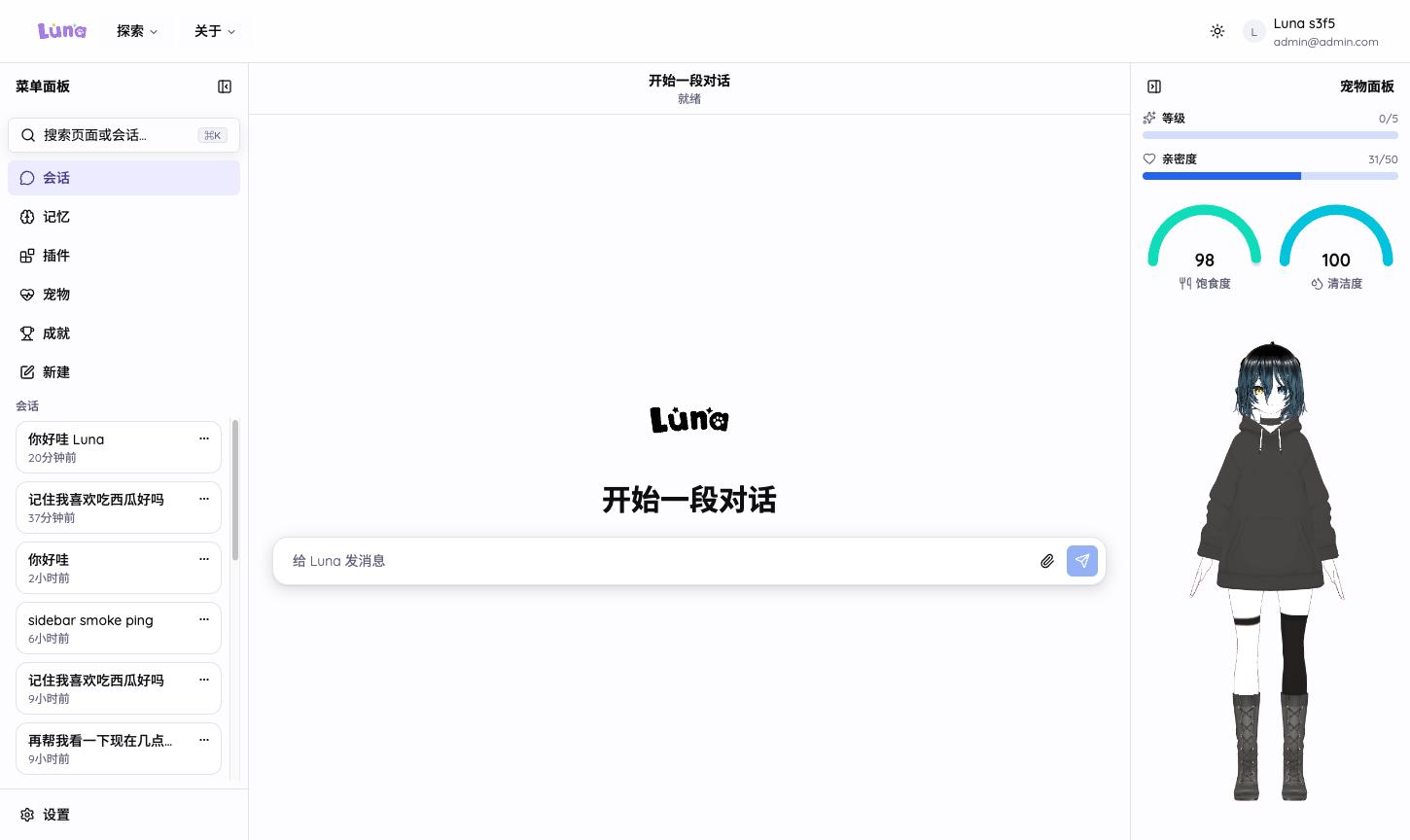
The finished product is here: LUNA. So what did we actually do to create a catgirl?
Technical Design
To build this product we put a lot of effort into everything—from architectural decisions and designing the whole Harness to the frontend, etc. We considered everything carefully and implemented many new things.
Nevertheless, the project was completed in less than 5 days, under great time pressure. During that period we spent roughly 1,000 tokens.
From the start we defined it as a full‑stack Web App. Choosing a unified front‑back framework was crucial. Our initial architecture used Next.js driven by OpenNext. For many reasons we later migrated to Nuxt, and finally to the TanStack Start framework. I’ll walk through that journey and the trade‑offs.
Agent Architecture Designed on Cloudflare Durable Objects
From the beginning we treated it as a unified front‑back Web App, initially deploying on OpenNext‑driven Next.js on Cloudflare.
When we first finished development we found it extremely slow, and the Next.js Adapter API isn’t supported by Cloudflare. That convinced us to refactor, dropping Next.js and moving to the Vue‑based Nuxt.js. Nuxt’s primitives unify KV, Database, and Blob, so Nuxt was a natural choice.
Cloudflare differs from Vercel; it is more of an all‑in‑one infrastructure platform that controls everything:
- SQL database – e.g., D1 SQLite
- NoSQL database – e.g., KV
- S3‑like storage – R2 Blob
Our initial design was simple and aligned with common thinking: store all user data and session data in the SQL database, and put user attachments in R2 Blob.
However, Cloudflare is a serverless provider, and serverless comes with its own challenges.
- Unlike Supabase, Cloudflare D1 is globally replicated; if we use the global replica, replication is asynchronous. When we write data, the replica may not yet be updated, leading to read latency.
- Our AI sessions need massive concurrent state updates, and D1 struggles to keep strong consistency under that load.
Consequently a lot of hidden problems appear, especially when synchronising sessions and information, creating serious hazards. We tried storing session data as JSON (or other formats) in R2 with a write lock for consistency, but R2’s I/O cost is high and, being remote storage, it isn’t suitable for repeatedly reading, mutating, and writing back an entire session.
That’s when I considered Cloudflare’s Durable Objects.
DOs are described with a JavaScript class, have a globally unique instance identity, and a single instance per Durable Object ID runs at a time. Each instance owns private, transactional, strongly consistent persistent storage and provides a full SQLite storage API.
export class MyDurableObject extends DurableObject<Env> {
  async sayHello() {
    let result = this.ctx.storage.sql
      .exec("SELECT 'Hello, World!' as greeting")
      .one();
    return result.greeting;
  }
}

export default {
  async fetch(request, env, ctx): Promise<Response> {
    const stub = env.MY_DURABLE_OBJECT.getByName(USER_ID);
    await stub.sayHello();
  }
}
We can map a user or a session directly to a Durable Object, making that object the holder of its own state and the coordinator of all accesses to it.
Durable Objects run in a serverless fashion, waking on demand, starting when they receive a request or an RPC call from another Worker, and being destroyed after a period of inactivity.
They also implement Alarms, matching our future need for scheduled tasks.
Durable Objects exist only on Cloudflare, so we deliberately gave up platform‑agnosticism and rebuilt the persistence layer in three tiers:
- Tier 1 – D1 SQLite for users and authentication: We use Better Auth and Drizzle.
- Tier 2 – Durable Objects for user data (memories, scheduled tasks, config): stored in each User DO’s
ctx.storage.sql. - Tier 3 – Durable Objects for session design: built using the Cloudflare Agents SDK.
           AI Chat
               │
      ┌────────┴────────┐
      │                 │
     D1                DO
      │                 │
     Auth        ┌──────┴──────┐
                 │             │
               User ──────> Sessions
                 │             │
              State A       State B
Thus SQL handles relatively stable global data, while the strongly consistent, concurrent‑coordinated state is delegated to Durable Objects.
For Luna specifically, two DOs each have a clear responsibility:
UserDOholds per‑user memories, config, pet stats, skill lists, and file indexes.ChatDOholds per‑session conversation history and model rounds.
A given user or session has only one instance running worldwide; write conflicts are coordinated by the DO singleton itself.
When a Worker receives a user message, it awakens the corresponding ChatAgent. The ChatAgent pulls memory from UserAgent to build the system prompt, streams the model, translates incremental model output into structured frames stored in Durable Objects, and finally streams the result back to the browser via SSE.
Moving from Nuxt to TanStack Start in 6 Hours Using Agents
As mentioned earlier, we first built the project with OpenNext’s Next.js, then migrated to Vue’s Nuxt.js because we liked Nuxt Hub’s platform‑agnostic nature.
When we settled on the DO architecture, we discovered that Next.js cannot properly bind Cloudflare Durable Objects—a known Cloudflare issue.
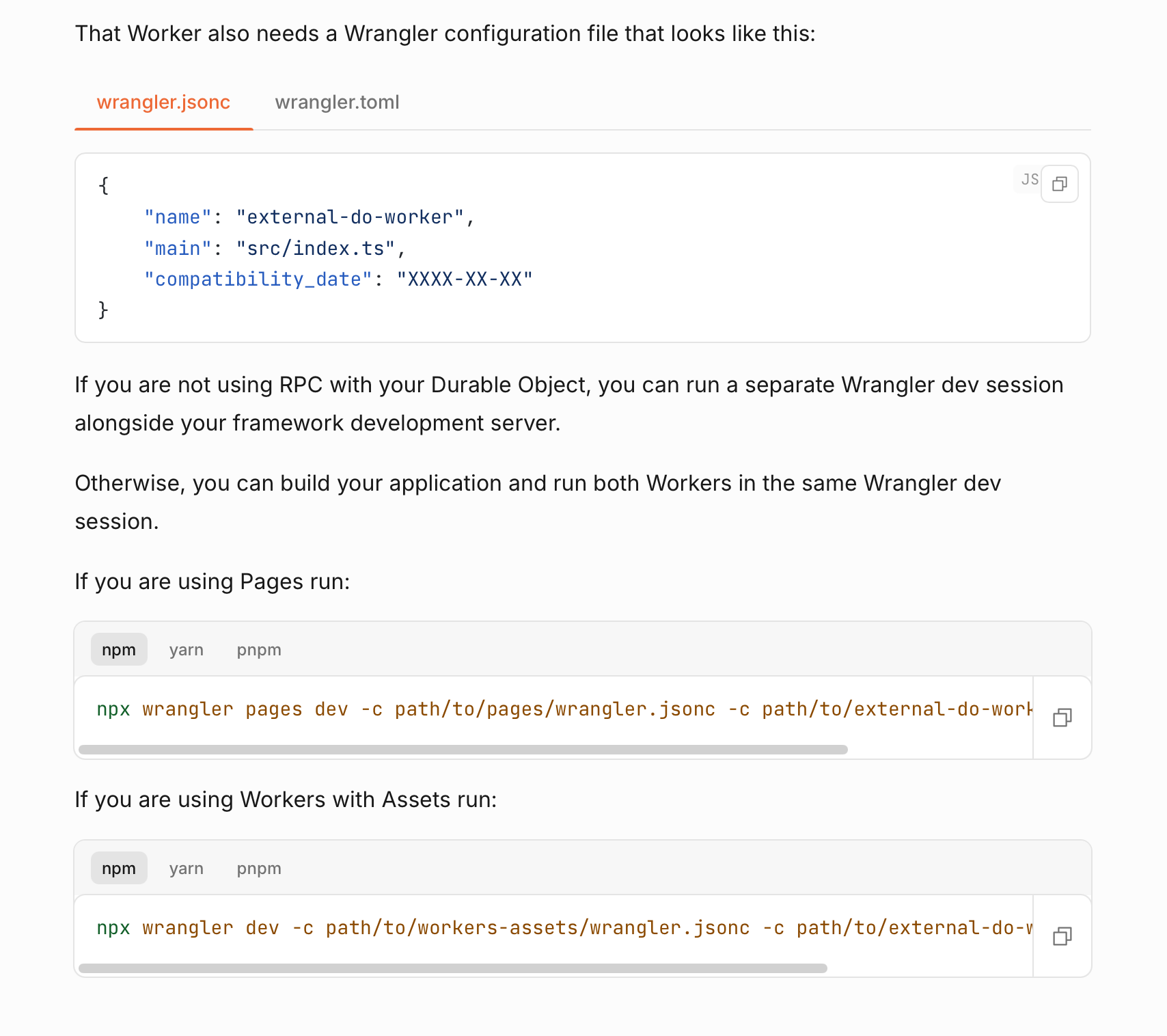
UserDO / ChatDO cannot be accessed from Nuxt’s adapter layer, and without those bindings the project stalls.
Thus we decided to move the entire codebase from Nuxt to TanStack Start using an Agent‑driven approach.
The migration took about six hours, following a “divide‑and‑conquer, ReAct, and test” methodology.
Step 1 – Clarify dependency mappings.
Nuxt is a convention‑heavy full‑stack framework with official modules for fonts, images, UI, content, animations, etc. We spun up several sub‑agents to find React equivalents—e.g., Nuxt Content → Content Collections, Nuxt Hub → Cloudflare Vite plugin, motion‑v → motion, TresJS → React Three Fiber, Nuxt UI → shadcn/ui. The React ecosystem is large enough that this step was smooth.
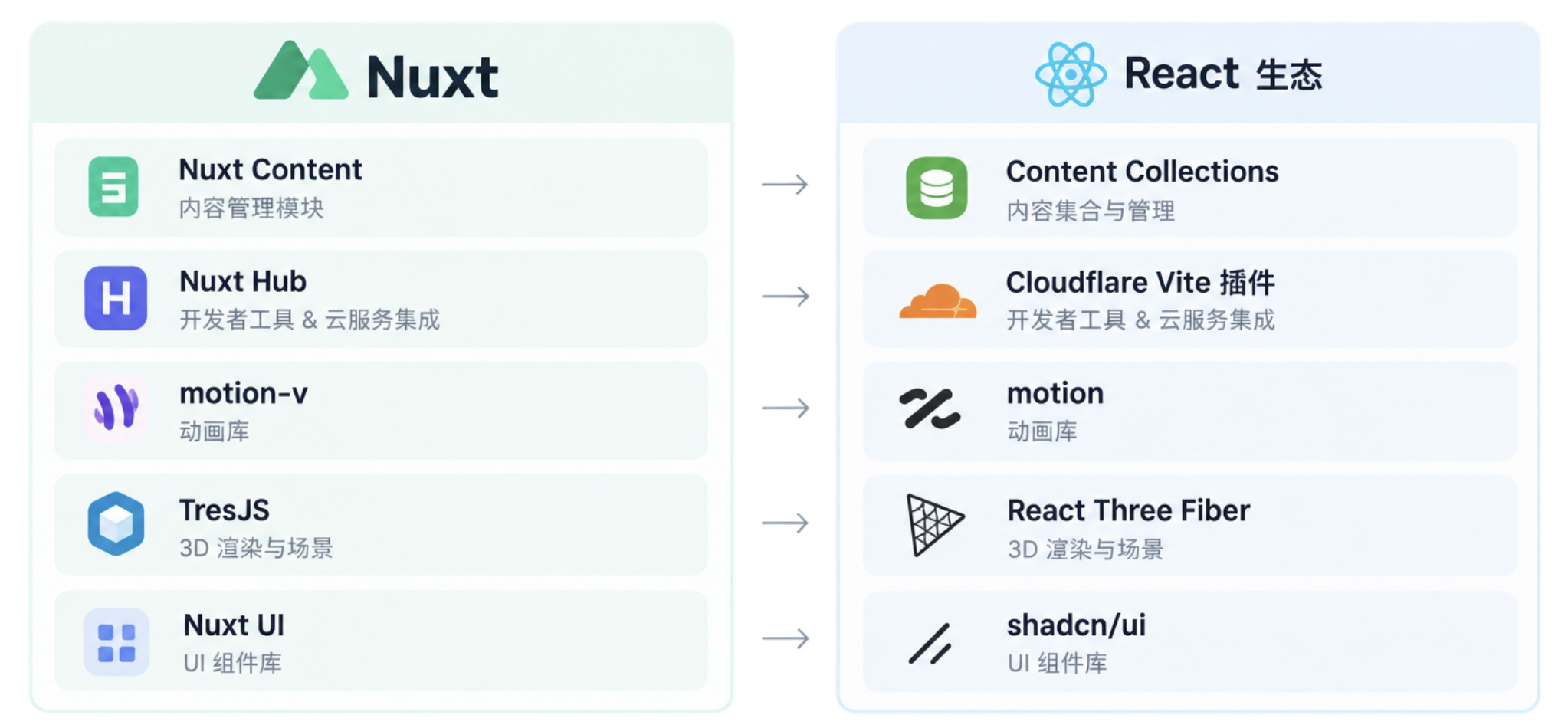
Step 2 – Configure Skills and Hooks.
We used Context7 to fetch the latest docs of target libraries, then installed official Skills via npx skills find and bunx @tanstack/intent, preventing agents from calling incorrect APIs. ESLint, Prettier, and Git hooks were also set up to run type‑checking, linting, and formatting after each step.
Step 3 – Break down layers and define monorepo boundaries.
Nuxt’s layers/ (ordered by prefixes like 00.site, 01.auth, 06.chat, …) were split into packages/@luna/*. apps/web became the sole deployable TanStack Start app; the remaining packages are exported via sub‑paths with no cross‑layer reverse dependencies.
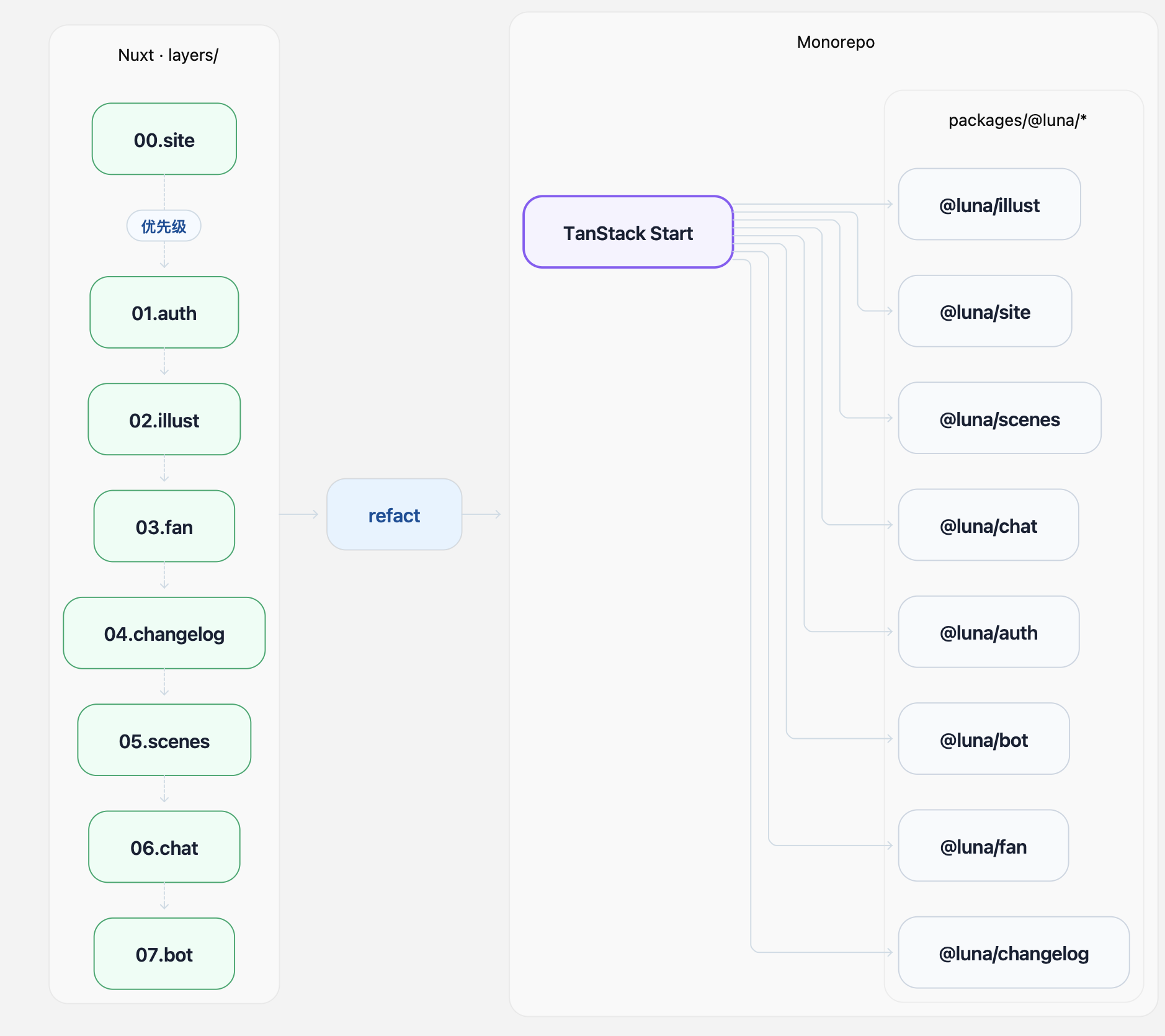
Explicit workspace dependencies replaced Nuxt’s auto‑discovery, making the structure clearer.
Step 4 – Switch UI system from Nuxt UI to shadcn.
We listed every component used, mapped them one‑by‑one to shadcn’s components, and placed them all in a @luna/ui sub‑repo inside the monorepo.
Step 5 – Outline the main Agent with sub‑agent execution order and start implementation.
Because the layers are tightly intertwined, we had to plan the execution order of sub‑agents carefully—deciding which steps could run in parallel and which had to be sequential. Balancing speed and quality, we ordered the monorepo rebuilds to ensure a successful refactor.
Step 6 – Launch the service and test with Chrome MCP.
We ran the dev server at 127.0.0.1:3000, used browser automation to walk through the full stack, and verified that DO RPC and SSE connections work correctly.
We performed no manual codemods; everything was handled by AI using Grok 4.6. After six hours we could run the complete conversation pipeline locally.
Three.js and VRM Pet
To give Luna a human‑like feel and a VR experience we planned to use models such as Live2D or 3D assets from the start.
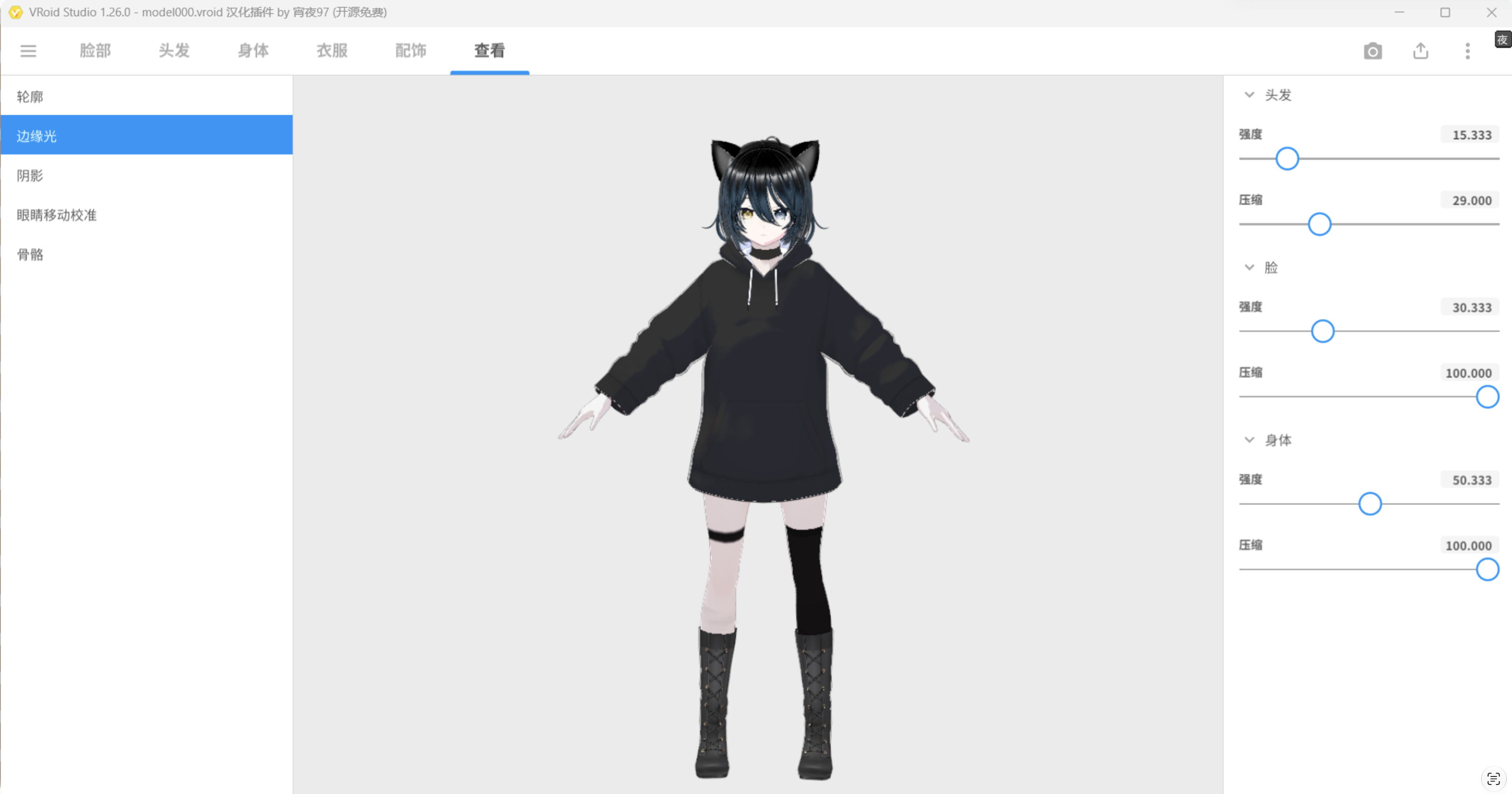
The VRM model was crafted by our art lead in an afternoon: sculpting in VRoid Studio, adjusting bones, exporting a .vrm file, and lighting it up in Three.js—about four hours total.
VRM is essentially an extended glTF; @pixiv/three-vrm handles humanoid bones, constraints, and blendshape expressions.
Our approach separates rendering from state.
- Rendering is an R3F scene that loads the VRM, computes a bounding‑box‑adaptive camera, and blends animation transitions.
- State is a tiny state machine managing idle / happy / sleep actions.
For performance the Three.js scene only loads when the pet panel is expanded; when collapsed it releases everything except the stats panel.
Pet stats (satiety, mood, intimacy) live inside UserDO and are nudged after each conversation.
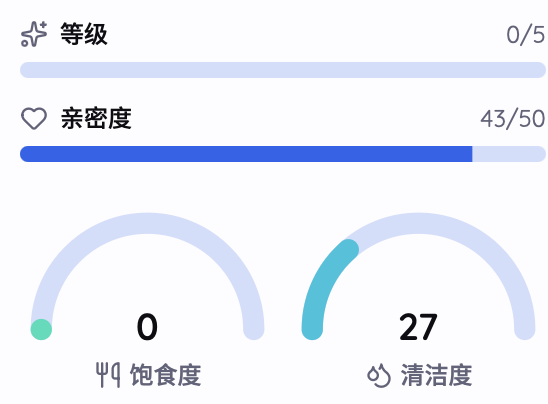
We drive actions via the Dialogue Transport Protocol (described later) during chat sessions.
When feeding, cleaning, etc., we also pre‑define some animations and maintain an internal state machine that occasionally triggers idle actions so the user never sees a static avatar.
Bash Tool Is the Whole Harness
Next we designed the Harness. In the Agent Loop we followed the classic Pi pattern: store messages, estimate token usage, and compress once the budget is reached.
The real challenge, however, was function calling.
Each AI request has a time cost. If we turn every chat tool, pet tool, and other utility into separate tools, the number of API calls would explode, causing huge latency. Therefore we defined a lightweight protocol and three core tools.
- view: the AI’s eyes; can retrieve large texts by line range and also supports multimodal media (images, videos, audio).
- patch: the AI’s hands; can modify multiple files in one go.
- bash: the AI’s heart; all other functionalities are implemented through Bash.
A Virtual FS
We wanted Luna to have a “real‑computer‑like” file space so she could tackle complex tasks: directories, files, installable skills, and attachment storage. Cloudflare Workers lack a local FS, R2 is object storage, and DO SQLite isn’t suited for large blobs.
Thus we built a Virtual File System (VFS) that separates index from content.
- Index – a
manifeststored in the user’s Durable SQLite, mapping each path to an object key, size, and type. - Content – immutable objects stored in R2; each write creates a new UUID key, and old objects are reclaimed by background jobs.
Permissions are layered:
/luna/system
    └── READ ONLY

/luna/user/<id>/
    ├── skills/       ← READ + WRITE
    └── attachments/  ← READ + WRITE

other paths
    └── DENY
Concurrent updates use CAS (compare‑and‑swap): each commit includes an expected version number; conflicts return an error and trigger a retry, preventing index corruption.
Quotas are explicit: max 5 MiB per file, up to 100 files, total 20 MiB.
A Virtual Bash
With the VFS in place, the next step was to give the Agent a powerful workhorse. bash provides ~90 % of the capability. The AI already knows most Bash syntax from its training data, so we only need to expose a sandboxed Bash environment.
We cannot hand the Agent a real Bash container for two reasons:
- Cost: spawning a container per conversation would be expensive.
- Security: a real Bash environment would have uncontrolled permissions.
Therefore we provide a virtual Bash using Just Bash, a Bash emulator that runs in a JS environment (our Cloudflare Workers). Its filesystem is the VFS described above, network access is limited to curl, and execution quotas are enforced. Each conversation runs in an isolated shell that cannot affect other sessions.
Because it’s virtual, we don’t need to preserve the tool as a standalone capability; instead we expose a custom factory function that lets us define commands.
For example, we can create a skill command that lets the agent search and read skills.
Adding new functionality to the Agent is simply a matter of defining a custom command + associated skills.
Want Luna to remember something? Append a line to a file. Want to install a skill? Use curl to fetch it into the skills directory. Want weather info, web search, Zhihu hot list? Register those as Bash custom commands. They can be invoked from the shell as CLI commands or called by the model as tools—one registry, two entry points.
Some commands are client commands that need browser cooperation (e.g., geolocation, notifications, theme switching). They travel via the ChatDO WebSocket round‑trip to the current tab, creating a truly interactive “human‑AI romance” feeling.
Thus our Harness is a filesystem + Bash; once the model learns to use Bash, it can manipulate Luna’s entire world.
Introducing Our New Protocol: Dialogue Transport Protocol
Every AI API round‑trip costs time and value, so we wanted the model to return multiple pieces of information at once.
Our first design was JSONL, one JSON object per line:
{type: "text", content: "hello\nworld"}
{type: "sticker", id: "smile"}
But we quickly ran into issues. Because the AI’s output is unstable, JSONL requires the model to escape every newline, which it rarely does reliably, making parsing fragile.
Therefore we created a brand‑new protocol meeting several criteria:
- No collision with common language syntax – we can’t rely on plain JSON or XML because the model may output code that conflicts with those formats.
- Support multiple messages – the AI should be able to emit several messages/events in one go, each with custom attributes (text, image, voice, video, reaction, vote, etc.).
- Familiar yet simple – low barrier, tolerant of errors (unclosed tags, mismatched quotes, nesting errors, duplicate nesting).
- Easy to parse – straightforward cross‑language implementation.
- Human‑readable – the output is plain text for both AI and developers.
We therefore designed our own frame format, called Dialogue Transport Protocol (DTP).
┌──────────────────────────────────────────┐
│ <|message                                │
│   id=msg_123                             │  ← Header / Envelope
│   type=text                              │
│   reply=msg_100                          │
│   target=user_42                         │
│   ...                                    │
│ |>                                       │
├──────────────────────────────────────────┤
│                                          │
│  Hello!                                  │
│                                          │  ← Payload
│  This is **Markdown**.                   │
│                                          │
│  ```ts                                   │
│  console.log("hello")                    │
│  ```                                     │
│                                          │
├──────────────────────────────────────────┤
│ <|/message|>                             │  ← End
└──────────────────────────────────────────┘
What the Protocol Looks Like
Each DTP frame is plain text; the delimiter <| ... |> almost never collides with Markdown, code blocks, or HTML, and the model can generate it without escaping.
The header uses HTML‑like key‑value pairs (id, type, reply, target, etc.) defined by the protocol; other fields can be added by specific message types.
The payload is ordinary Markdown.
<|message id=a type=text |>
Hello
<|/message|>

<|message id=b type=sticker |>

<|message id=c type=reaction target=a emoji=❤️ |>

<|message id=d type=vote target=a options="A,B,C" |>
Streamed Parsing
Since the model streams token‑by‑token, DTP provides a streaming parser that consumes chunks as they arrive, performs implicit closing and reference resolution at the end, and shares the same lexer/parser as the batch mode.
In Luna’s conversation pipeline the streaming parser sits between model output and frontend rendering: it translates the text stream into structured frames, stores them in DOs, pushes them via SSE, and dispatches events.
Historical messages are deserialized back into DTP text and injected into the system prompt so the model can refer to existing IDs when replying.
During generation, the streaming parser maps temporary IDs to stable server IDs and forwards the appropriate payload to the frontend. The process is completely transparent to the client; it receives typed messages one by one.
Epilogue
Five days, three people, about 1,000 tokens, and we built our own OC catgirl—what a journey.
- For strongly consistent sessions we gave up platform‑agnosticism and went all‑in on Cloudflare Durable Objects.
- To make the Harness universally useful we stripped away a bunch of scattered tools and kept only Bash.
- To satisfy our protocol needs we abandoned JSON and adopted the custom DTP message format.
- To get the architecture running we left Nuxt’s comfort zone, using Agents to move the entire app in six hours.
These trade‑offs gave Luna her own filesystem, body, memory, skills, and communication protocol.
If you also want to raise a Luna, feel free to chat with her at luna.htu.me/chat.
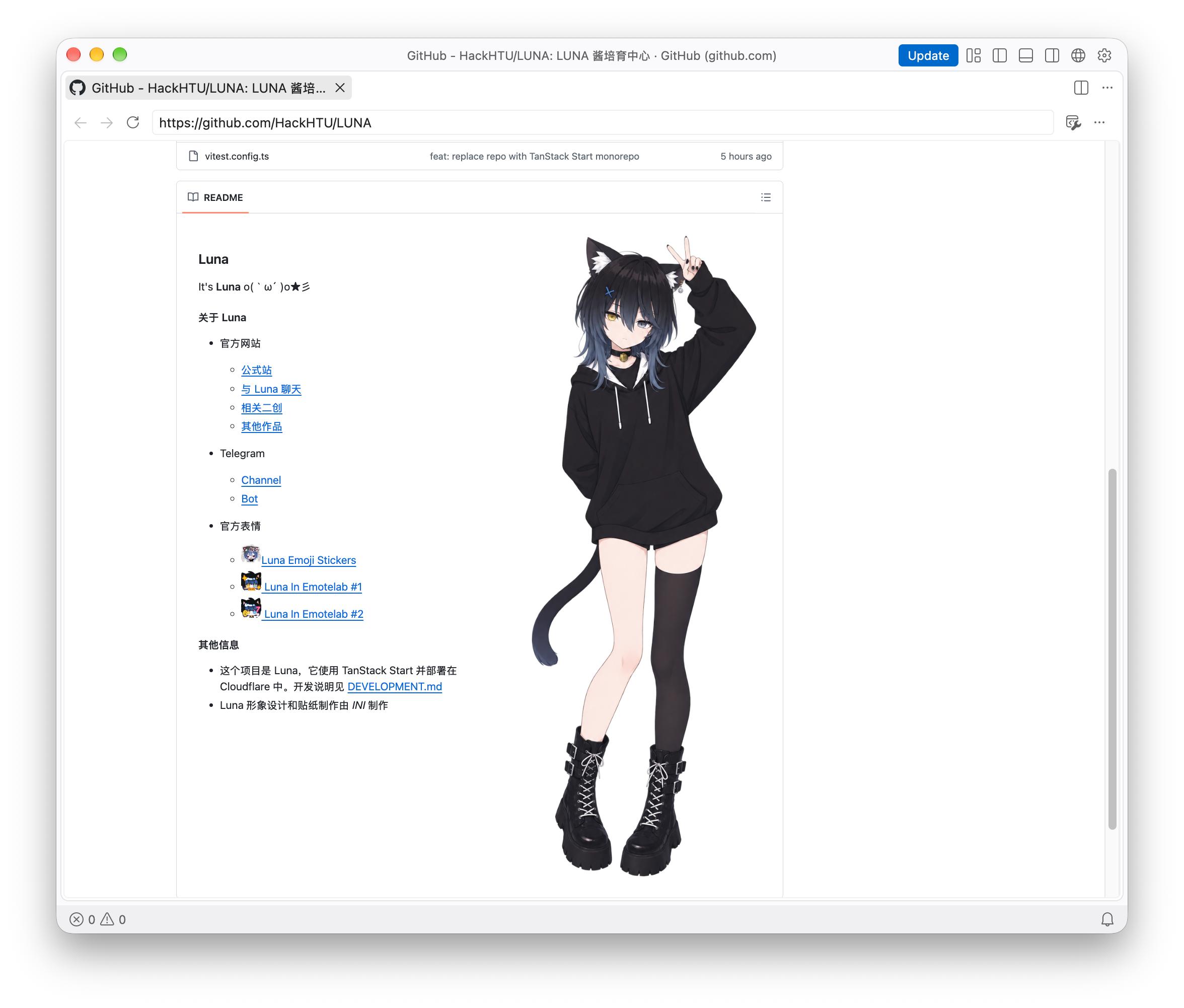
The source code is open‑sourced at LUNA.
Discussion
Continue the discussion.
Questions, corrections, and considered disagreements are welcome. Your email stays private.
Leave a comment
Comments
0 commentsNo responses yet. Start the conversation.